---
title: How do I Create a Quiz for my Students in my ExamRevision account?
description: How do I Create a Quiz for my Students in my ExamRevision account?
---
[Skip to content](https://support.examrevision.ie/how-do-i-create-a-quiz-for-my-students-in-my-examrevision-account#main-content)
English - Ireland
Show submenu for translations
[](https://www.examrevision.ie/?hsLang=en-ie)
- Home
- Products
- Pricing
- Blog
- Company
Open main navigation
Close main navigation
- Home
- Products
- Pricing
- Blog
- Company
- English - Ireland
Show submenu for translations
- [Contact us](https://www.examrevision.ie/contact-us)
[Contact us](https://www.examrevision.ie/contact-us?hsLang=en-ie)
How can we help you?
- There are no suggestions because the search field is empty.
1. [Customer Support](https://support.examrevision.ie/?hsLang=en-ie)
2. [Getting started](https://support.examrevision.ie/getting-started?hsLang=en-ie)
# How do I Create a Quiz for my Students in my ExamRevision account?
To create an assignment:
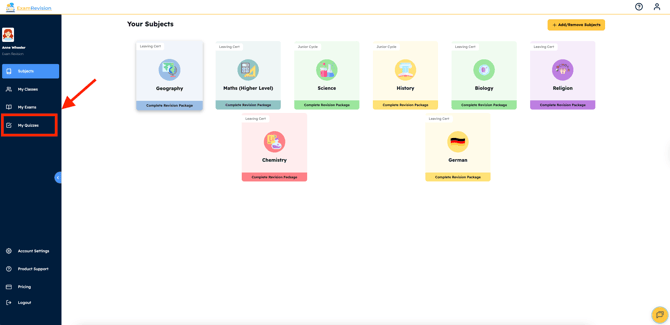
1. Log in to your account & tap on the **My** **Quizzes** tab.
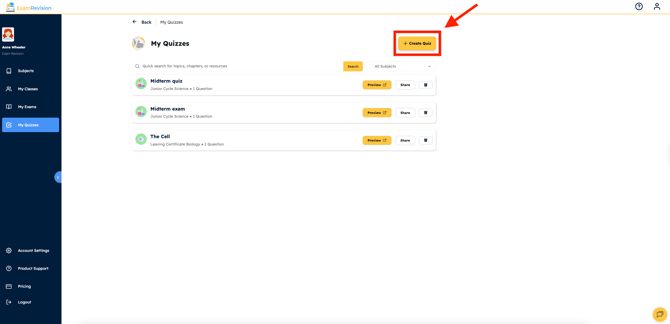
2. Select the '**Create Quiz**' button.
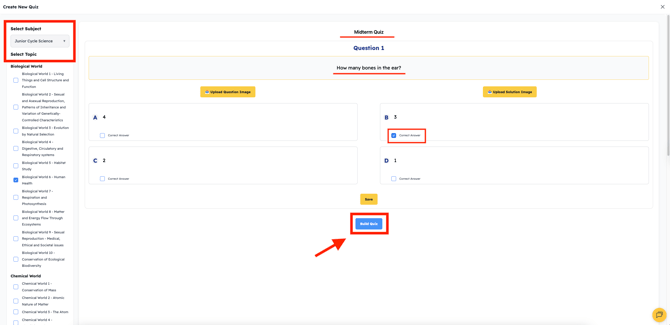
3. Fill out the Quiz subject, topic, title, questions, options and also make sure to select the correct answer. Once you're done, select '**Build Quiz**'.
---
Video Tutorial👇
- [FAQs](https://support.examrevision.ie/faqs?hsLang=en-ie)
- [Getting started](https://support.examrevision.ie/getting-started?hsLang=en-ie)
- [Troubleshooting](https://support.examrevision.ie/troubleshooting?hsLang=en-ie)
- [General](https://support.examrevision.ie/general?hsLang=en-ie)
- [Support](https://support.examrevision.ie/support?hsLang=en-ie#main-content)
- [Login](https://support.examrevision.ie/support?hsLang=en-ie#login)
- [Subjects](https://support.examrevision.ie/support?hsLang=en-ie#subjects)
- [Settings](https://support.examrevision.ie/settings?hsLang=en-ie)
- [Exam Builder](https://support.examrevision.ie/exam-builder?hsLang=en-ie#main-content)
- [Teachers](https://support.examrevision.ie/exam-builder?hsLang=en-ie#teachers)
- Home
- Products
- Pricing
- Blog
- Company
# ExamRevision Ltd
[mailto:email@email.com](mailto:email@email.com)
Copyright © 2026, ExamRevision Ltd
```json
{
"@context" : "https://schema.org",
"@type" : "VideoObject",
"caption" : {
"@type" : "MediaObject",
"contentUrl" : "https://support.examrevision.ie/media-transcripts/197696214582/en.vtt",
"inLanguage" : "en",
"name" : "en Captions"
},
"contentUrl" : "https://20037890.fs1.hubspotusercontent-na1.net/hubfs/20037890/desktop%20create%20quiz.mp4",
"dateModified" : "2025-10-16T14:20:43.820Z",
"duration" : "PT37S",
"height" : 1080,
"name" : "desktop create quiz",
"thumbnailUrl" : "https://20037890.fs1.hubspotusercontent-na1.net/hubfs/20037890/desktop%20create%20quiz.mp4/medium.jpg",
"uploadDate" : "2025-10-16T14:20:33.355Z",
"width" : 1920
}
```