---
title: How do I change my ExamRevision password?
description: How do I change or reset my password in my ExamRevision Account?
---
[Skip to content](https://support.examrevision.ie/how-do-i-change-my-examrevision-password#main-content)
English - Ireland
Show submenu for translations
[](https://www.examrevision.ie/?hsLang=en-ie)
- Home
- Products
- Pricing
- Blog
- Company
Open main navigation
Close main navigation
- Home
- Products
- Pricing
- Blog
- Company
- English - Ireland
Show submenu for translations
- [Contact us](https://www.examrevision.ie/contact-us)
[Contact us](https://www.examrevision.ie/contact-us?hsLang=en-ie)
How can we help you?
- There are no suggestions because the search field is empty.
1. [Customer Support](https://support.examrevision.ie/?hsLang=en-ie)
2. [FAQs](https://support.examrevision.ie/faqs?hsLang=en-ie)
# How do I change my ExamRevision password?
To change your ExamRevision password:
1. Log into your ExamRevision account.
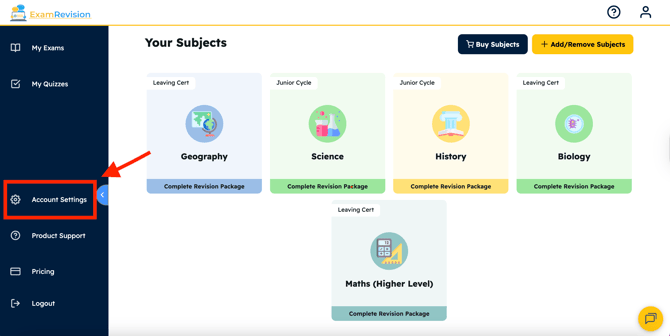
2. Select **Account Settings** from the left sidebar; you might need to scroll down.
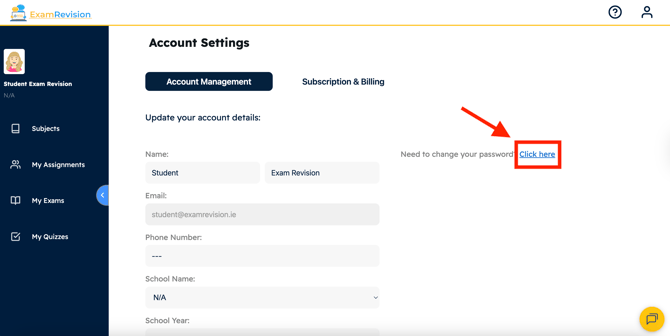
3. Click the blue **'Click here'** beside 'Need to change your password?'.
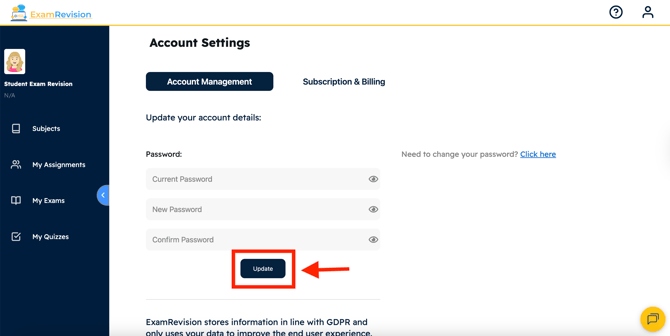
4. Enter your current password, then your new password twice to confirm.
5. Tap **Update**.
If you forget your password, you can reset it by clicking **Forgot Password** on the login page.
---
Video Tutorial👇
- [FAQs](https://support.examrevision.ie/faqs?hsLang=en-ie)
- [Getting started](https://support.examrevision.ie/getting-started?hsLang=en-ie)
- [Troubleshooting](https://support.examrevision.ie/troubleshooting?hsLang=en-ie)
- [General](https://support.examrevision.ie/general?hsLang=en-ie)
- [Support](https://support.examrevision.ie/support?hsLang=en-ie#main-content)
- [Login](https://support.examrevision.ie/support?hsLang=en-ie#login)
- [Subjects](https://support.examrevision.ie/support?hsLang=en-ie#subjects)
- [Settings](https://support.examrevision.ie/settings?hsLang=en-ie)
- [Exam Builder](https://support.examrevision.ie/exam-builder?hsLang=en-ie#main-content)
- [Teachers](https://support.examrevision.ie/exam-builder?hsLang=en-ie#teachers)
- Home
- Products
- Pricing
- Blog
- Company
# ExamRevision Ltd
[mailto:email@email.com](mailto:email@email.com)
Copyright © 2026, ExamRevision Ltd
```json
{
"@context" : "https://schema.org",
"@type" : "VideoObject",
"caption" : {
"@type" : "MediaObject",
"contentUrl" : "https://support.examrevision.ie/media-transcripts/196901436737/en.vtt",
"inLanguage" : "en",
"name" : "en Captions"
},
"contentUrl" : "https://stream.mux.com/G023MQIQrAMLA01o01YlD1zQwby006rMrMio1B8ZhVgHVFU/capped-1080p.mp4",
"dateModified" : "2025-10-01T17:00:47.809Z",
"duration" : "PT32S",
"height" : 1080,
"name" : "Desktop Change password",
"thumbnailUrl" : "https://20037890.fs1.hubspotusercontent-na1.net/hubfs/20037890/Desktop%20Change%20password.mp4/medium.jpg",
"uploadDate" : "2025-10-01T17:00:37.338Z",
"width" : 1920
}
```